780
Status
📜📞🔧🔧❌
Senior Golang Software Engineer
Interview process
flowchart LR
    sr(Send resume) --> hr(HR call) --> ti(Technical Interview I) --> task(Task)--> ti2(Task Review) --rejected--x hr2(HR Interview) -.-> o(Offer)
Apply Way
jobinja
Interview Date
-
Sent Resume
1405.04.21 -
HR Call
1405.04.21 -
Technical InterviewI
1405.04.28 -
Technical InterviewII
1405.05.05 -
Rejection Email
1405.05.10
Interview Duration
-
Technical Interview I
1 hour -
Technical InterviewII
1 hour
Interview Platform
Google Meet
Technical Interview I
-
Tell me about yourself.
-
What’s the difference between a goroutine and an OS thread?
Answer
-
What is buffered and unbuffered channel in Go?
Answer
-
Unbuffered
(make(chan T))has zero capacity and requires both sender and receiver to be ready simultaneously—acting as a synchronous handoff. -
Buffered
(make(chan T, n))has a fixed queue; senders block only when full, receivers block only when empty—acting as an asynchronous mailbox.Unbuffered channels guarantee a synchronization point (safe for signaling), while buffered channels decouple goroutines for higher throughput. Use unbuffered by default for simplicity and safety; use buffered only for known bursts or rate-limiting, and never guess the buffer size without benchmarking.
-
-
What is a worker pool and what are its benefits?
Answer
- Bounded resource usage — you control exactly how many things run concurrently (e.g., match DB connection pool size).
- Backpressure — if the queue fills up, producers slow down or block, instead of the system falling over.
- Reusability — workers aren’t recreated per task, avoiding goroutine/thread spin-up overhead.
- Easier to reason about — a known, fixed concurrency level makes load testing and capacity planning predictable.
- Graceful shutdown — you can close the job channel and sync.WaitGroup.Wait() for a clean drain.
-
How does Go’s garbage collector work?
Answer
Go’s Garbage Collector (GC) is famously simple from a developer’s perspective (you just let variables fall out of scope), but under the hood, it is a highly sophisticated, modern piece of engineering.
Its primary design goal is low latency, meaning it aims to keep application pause times as short as possible (typically under 500 microseconds), rather than maximizing overall throughput.
Here is a breakdown of how Go’s GC works.
1. The Core Algorithm: Tri-Color Mark-and-Sweep
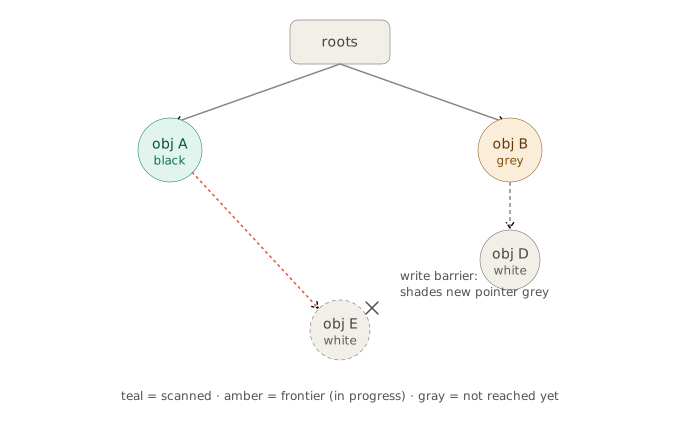
Go uses a concurrent tri-color mark-and-sweep algorithm.
Imagine every object in memory as a node in a giant web, connected by pointers. The GC’s job is to start at “root” pointers (like global variables and local variables on your CPU stacks) and trace this web to find out what is still alive.
To do this concurrently without stopping your program, it colors objects three ways:
- White: The object has not been visited yet. (At the end of the cycle, anything still white is garbage).
- Grey: The object has been visited, but the GC hasn’t yet checked the pointers inside this object to see what they point to. (Think of grey as the “to-do list”).
- Black: The object has been visited, and all the objects it points to have been successfully marked grey/black. (This object is definitively alive and fully processed).
The Rule: A black object must never be allowed to point directly to a white object. If that happens, the white object gets lost and becomes a memory leak.
2. The Lifecycle of a GC Cycle
A single GC cycle happens in four distinct phases. Two of these require briefly stopping your program (Stop-The-World, or STW), but they are incredibly fast.
- Mark Start (STW - very brief): The GC stops the program just long enough to scan the stacks and global variables. It turns everything those roots point to Grey, and turns the roots themselves Black.
- Concurrent Marking (No pause): The GC runs on dedicated background threads. It picks a Grey object, looks at the pointers inside it, and turns the objects it points to Grey. Once finished, it turns the original object Black. It repeats this until there are no Grey objects left. Meanwhile, your application is running normally.
- Mark Termination (STW - very brief): The GC stops the program again to clean up. It re-scans any stacks that might have changed during the concurrent phase, clears internal GC state, and prepares for the next step.
- Concurrent Sweeping (No pause): The GC runs in the background and walks through the memory pages. Any object that is still White is freed up and returned to the memory pool for future use.
3. The Magic Trick: The Write Barrier
If your program is running while the GC is coloring things, what happens if your program suddenly changes a pointer?
For example: What if the GC just turned Object A Black, and then your program changes Object A to point to a brand new White object? This violates the core rule and means the new object would be mistakenly deleted.
Go solves this using a Write Barrier. The Go compiler secretly injects a tiny piece of code every time your program writes to a pointer. If the GC is currently in the concurrent marking phase, this write barrier intercepts the assignment. It ensures that if a Black object is forced to point to a White object, the White object is immediately turned Grey (added to the to-do list) so it doesn’t get lost.
Go specifically uses a Hybrid Write Barrier (introduced in Go 1.8) which drastically reduced the length of the STW pauses by simplifying how stack rescanning works.
4. What Go’s GC Does NOT Do (Common Misconceptions)
- No Generational GC: Languages like Java or V8 (JavaScript) use “generational” GCs, assuming that most objects die young (created and destroyed in milliseconds). They split the heap into “Young” and “Old” generations. Go does not do this. Go uses a unified heap. Why? Go’s pointer-heavy structures (like slices and maps) and the way Go code is typically written didn’t show a massive “die young” benefit, and a unified heap is much simpler to implement without introducing latency spikes.
- No Compaction (Moving objects): Many GCs move surviving objects around in memory to pack them tightly together and prevent fragmentation. Go does not move objects. Once an object is allocated at a memory address, it stays there until it dies. This makes Go’s GC much faster and simpler, but it means memory can become fragmented over time.
5. How to Control It
By default, Go triggers a GC cycle when the heap size doubles. You can tweak this using environment variables:
GOGC: The default is100(meaning 100% growth = doubling). If you setGOGC=200, the heap can grow by 300% before a GC triggers (less frequent GC, but higher memory usage). If you setGOGC=50, it triggers after 50% growth (more frequent GC, lower memory footprint).GOMEMLIMIT(Introduced in Go 1.19): This is a hard upper limit on total memory (heap + off-heap + OS overhead). If Go approaches this limit, it will trigger GC as aggressively as possible to try and stay under the ceiling, preventing your app from being killed by the OS’s Out-Of-Memory (OOM) killer.
-
You have n files (txt) and we want to remove duplicate files. How do you do it?
Answer
Part 1: Standard Scenario (Sufficient RAM)
When you have enough RAM, the primary goal is speed. We can leverage in-memory data structures to avoid unnecessary disk I/O.
The Algorithm
- Filter by Size: Iterate through all
nfiles and group them by their file size. If two files have different sizes, they absolutely cannot be duplicates. This eliminates the vast majority of files instantly with zero file-content reading. - Hash the Content: For files that share the same size, read their contents and calculate a cryptographic hash (e.g., SHA-256).
- Use a Hash Map: Use an in-memory dictionary/hash map where the
Keyis theSHA-256 hashand theValueis alist of file paths. - Resolve Duplicates:
- If you compute a hash and it’s not in the map, add it.
- If the hash is already in the map, append the current file path to the value list.
- Delete: Iterate through your hash map. For every key that has more than one file path in its list, keep the first file and delete the rest.
Complexity
- Time Complexity: O(N) where N is the total number of bytes across all files.
- Space Complexity: O(U) where U is the number of unique files (required to store the hash map and active file handles).
- Filter by Size: Iterate through all
-
OK, you don’t have enough RAM to read the files; you only have 20KB of RAM. What would you do?
Answer
Part 2: Constrained Scenario (Only 20KB RAM)
20KB of RAM is extremely restrictive. You cannot hold a standard hash map, nor can you hold a large list of file paths (a 100-character path string for 200 files already exceeds 20KB).
You must rely entirely on External Sorting and Streaming (Chunking). This approach is similar to how classic Unix tools like
fdupesoperate under the hood, heavily optimized for disk rather than RAM.Step 1: Group by Size using Disk
Since you cannot hold a map of
size -> [files]in RAM, you offload this grouping to disk.- Create a temporary text file (
sizes.txt). - Read the directory. For each file, append
FileSize|FilePath\ntosizes.txt. (This takes almost zero RAM). - Use an External Sort (e.g., a disk-based merge sort) to sort
sizes.txtnumerically by the file size. Note: External sort only requires small sequential reads/writes of chunks into your 20KB RAM buffer. - Iterate through the sorted
sizes.txtsequentially. Any file with a unique size is immediately marked as “Keep”. Group the paths of files with identical sizes into temporary “candidate lists” on disk.
Step 2: Progressive Chunking (No Hashing)
Why no hashing in this scenario? To hash a file, you must process every single byte of the file. If two 10GB files differ in the very first byte, reading and hashing the remaining 10GB is a massive waste of disk I/O.
Instead, compare the candidate files byte-by-byte in small chunks that fit inside your 20KB RAM limit.
Assume you have a group of 5 candidate files that are all exactly 1,000,000 bytes long:
- Open all 5 file handles simultaneously.
- Allocate a small read buffer in your RAM (e.g., a 2KB character array).
- Read the first 2KB from File 1 into Buffer A.
- Read the first 2KB from File 2 into Buffer B and compare them.
- If they differ: Close File 2. It is unique. Remove it from the candidate group.
- If they match: Discard Buffer B, read File 3 into Buffer B, compare against Buffer A, and so on.
- RAM Check: Comparing 5 files requires holding one 2KB “master” buffer and one 2KB “comparison” buffer at a time (4KB total). This easily fits in 20KB. (If the candidate group is massive, you might have to compare in sub-groups, but typically, groups of identical sizes are small).
- Once you have compared the first 2KB of all candidates, discard the buffers, advance the file pointers, and repeat the process for the next 2KB chunk.
- If you reach the End of File (EOF) and multiple files have matched perfectly across all chunks, they are exact duplicates.
Step 3: Delete
Keep the first file in the fully matched group, and issue OS-level delete commands for the rest.
- Create a temporary text file (
-
We have a file with a lot of names. How do you remove duplicate names?
Answer
In-memory: Stream the file, use a hash set to track seen names, write only first occurrences — O(n) time, O(unique names) memory. In go we can use
map. -
Right! If we don’t want to use memory, how do we solve it?
Answer
We must use an
O(n^2)loop. -
Design a mobile top-up system where users can purchase prepaid credit by entering their phone number and selecting a mobile operator. Assume each operator exposes a set of APIs for processing top-ups. Walk through your system design and the end-to-end request flow.
Answer
Step-by-step
1. Create the transaction
Status:
pending
2. Reserve the wallet balance
- Don’t deduct it yet.
- Move the amount from available to reserved.
Status:
FundsReserved
3. Publish
TopUpRequestedThe worker processes the request asynchronously.
4. Call the operator
If successful:
- Capture the reservation (permanently deduct the funds).
- Mark the transaction as
Completed.
If failed:
- Release the reservation.
- Mark the transaction as
Failed.
Why reserve instead of deduct immediately?
Suppose the user has $10 and buys a $10 top-up.
If you deduct immediately and the operator later returns an error, you must issue a refund, which introduces extra complexity and can fail.
With reservations:
- The money is temporarily locked.
- It can’t be spent twice.
- If the operator fails, you simply release the reservation.
- If the operator succeeds, you capture it.
This is the same pattern used by payment systems (authorization → capture).
-
We get an error when buying a top-up from a third-party operator, for example, a timeout. How would you handle this?
Answer
Reserve Funds
    │
    ▼
Call Operator
    │
    ▼
Timeout
You should not immediately release the reservation because the operator may have successfully processed the top-up but failed to send a response.
Instead:
- Mark the transaction as
Pending. - Retry or query the operator’s status API (or wait for a webhook if available).
- Only after receiving a definitive success or failure:
- Capture the reservation on success.
- Release the reservation on failure.
This avoids both charging the user without delivering the top-up and giving away a free top-up. This pattern is commonly used in payment and financial systems to ensure consistency across distributed services.
- Mark the transaction as
-
How do you choose a database for this service, SQL or NoSQL?
Answer
This product is CP and it’s better to use SQL.
-
What is ACID?
Answer
-
Say some problems that one of the isolation levels solves.
-
What is a dirty read?
Answer
A dirty read is a database error that happens when one transaction reads data changed by another transaction that has not finished or saved yet. If that first transaction cancels or rolls back its changes, the second transaction is left using data that never truly existed.
- Transaction A changes a value (like lowering item count from 10 to 9) but does not commit/save yet.
- Transaction B reads that new value (9) right before Transaction A finishes.
- Transaction A encounters an error and rolls back, resetting the value back to 10.
- Transaction B base their action on a false number (9), causing a dirty read error.
-
What is the CAP theorem?
Answer
Technical Interview II (Live code)
You have this code:
    package main

    import "fmt"

    type Account struct {
        ID      string
        Balance float64
    }

    func main() {
        accounts := []Account{
            {"A", 100},
            {"B", 200},
            {"C", 0},
        }

        transactions := []struct {
            from, to string
            amount   float64
        }{
            {"A", "B", 50},
            {"B", "C", 300},
            {"A", "C", 10},
        }

        for _, t := range transactions {
            fromAcc := findAccount(accounts, t.from)
            toAcc := findAccount(accounts, t.to)

            if fromAcc == nil || toAcc == nil {
                fmt.Println("Invalid account")
                continue
            }

            if fromAcc.Balance >= t.amount {
                fromAcc.Balance -= t.amount
                toAcc.Balance += t.amount
                fmt.Println(fromAcc.Balance, toAcc.Balance)
            }
        }

        fmt.Println(accounts)
    }

    func findAccount(accs []Account, id string) *Account {
        for _, a := range accs {
            if a.ID == id {
                return &a
            }
        }
        return nil
    }
- What does this code print??
- Fix the bug.
- Add some validations and return meaningful messages to the user so they know what happened.
- We want to improve the performance and process these transactions more efficiently. How would you approach this?
Answer (My solution)
Here and also in playground.
Score
7/10
خیلی آسون و گلابی بود برام هر چند در تلاش بودن که بندازن گوشه رینگ ولی سوالا کاملا تیپیکال بود. نفهمیدم چرا ریجکت کردن.